
Small Business IT Support in London: What to Expect
What small business IT support in London should include, how to judge response times, contracts and security, and why one local team for IT and telecoms works.

12 min read

The best IT support for a small London business is one team that knows your setup, answers fast and covers the whole picture: devices, network, phones, broadband and security. At Comms Circle, the same local engineers handle your telecoms and IT, with real engineer support around the clock rather than a call centre, and billing split by site, team or cost centre. This guide explains what good support includes, how to read a proposal and which questions to settle before you sign.
TL;DR
- Good small business IT support covers day-to-day fixes, proactive maintenance, security basics, backups and a clear route to an engineer who knows your business.
- Judge a provider on how it defines response and fix times, who answers the phone, and what happens when a target is missed.
- Ask for scope, exclusions, notice periods and renewal terms in writing before you commit.
- Security baselines such as firewalls, secure configuration, updates, access control and malware protection are set out by the National Cyber Security Centre.
- Using one supplier for IT, phones, broadband and mobiles removes the finger-pointing between suppliers when something stops working.
Table of Contents
- What small business IT support should cover
- Managed support or call-out help
- Response times that mean something
- How IT support is priced and billed
- Security and continuity: the baseline
- Why one team for IT and telecoms
- What we offer small London businesses
- Checking the contract before you sign or renew
- Signs your current support is not working
- How to choose a provider: a short process
- FAQ
- Sources
What small business IT support should cover
A small team in London depends on the same handful of things every day: laptops that start, email that arrives, a network that stays up, files that are backed up and phones that ring. IT support is the service that keeps those things working and puts them right quickly when they do not.
A complete service normally has these parts:
- A helpdesk for everyday problems. Password resets, a printer that will not connect, a new starter who needs a laptop and accounts.
- Onsite attendance when remote help is not enough. Dead hardware, cabling and Wi-Fi problems still need someone in the room. For a London office, an engineer who is already in London matters.
- Maintenance in the background. Updates, patching and monitoring that stop small faults becoming outages.
- Account and device management. Microsoft 365 users, laptops, desktops and mobiles set up and removed in a controlled way.
- Security. Multi-factor authentication, malware protection, email filtering and sensible access rules.
- Backup and recovery. Copies of your data and a clear idea of how quickly you can get back to work.
- Planning. Advice on what to replace, what to move to the cloud and what to budget for.
Not every business needs every item at the same depth. A five-person consultancy has different needs from a 40-person recruitment agency with two offices. What matters is that the service is fitted to your actual setup instead of a standard package that leaves gaps.
Our IT Essentials service is built for exactly this kind of small London business, and it sits alongside our WiFi and networking, security and telecoms work so that the whole estate has one owner.
Managed support or call-out help
There are two broad ways to buy support.
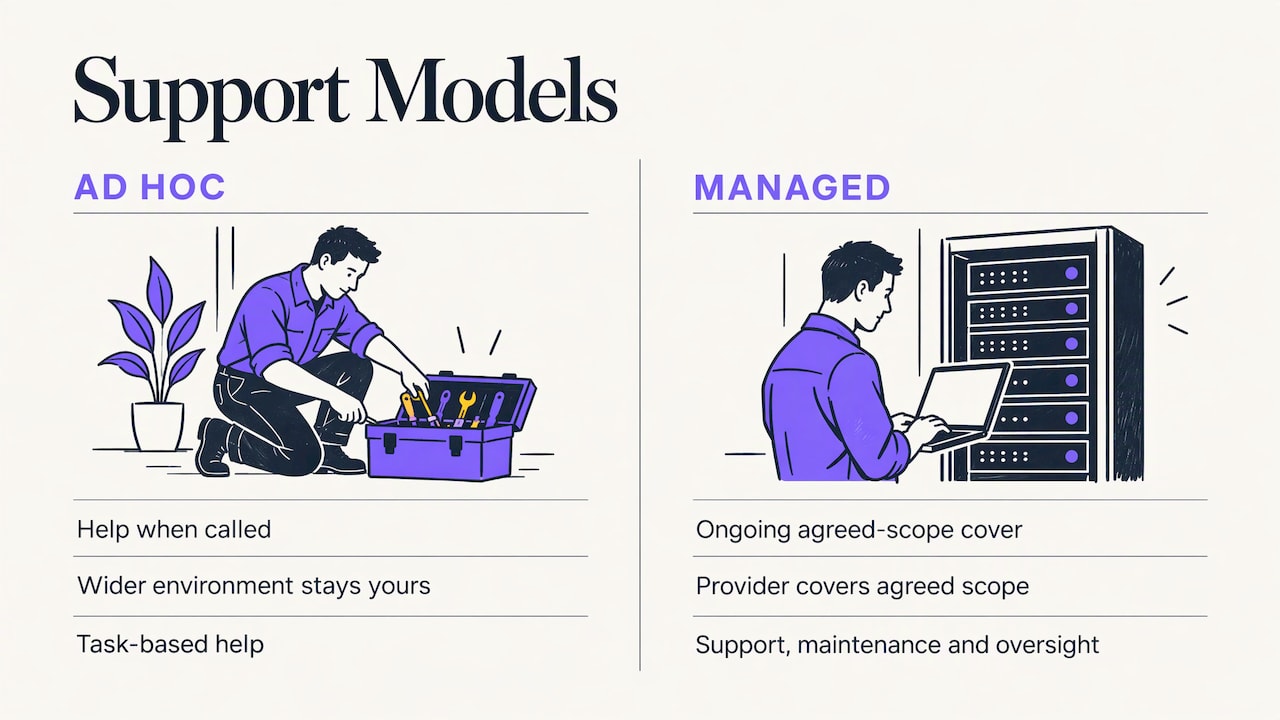
Ad hoc support means you call when something breaks or when you plan a change. The provider deals with the task and you stay responsible for the wider environment. Nobody is watching your systems between calls, and nobody has promised to.
Managed support means the provider looks after an agreed set of users, devices and services on an ongoing basis. It combines user support with maintenance, administration and oversight, and the responsibilities are written down in advance. A sound managed service starts with an assessment of what you have, not an assumption that everything can be supported from day one.
For most small businesses with real reliance on their systems, managed support is the sensible default. The incentives line up: a provider paid to keep your systems healthy works to prevent faults, while a provider paid only per fix earns more when things go wrong. It also means someone is looking at your environment before a failed update or an offline device becomes a lost morning.
One point to read carefully in any proposal: monitoring is not the same as support. A monitoring tool can flag that a device is offline. What matters is who responds to the alert, how quickly, and whether the repair is included or charged separately. Likewise, buying licences, hosting or equipment should not be assumed to include unlimited technical help. Ask for each of these to be spelled out.
Response times that mean something
Every provider advertises fast response. The useful question is what the promise actually measures. Three different milestones are often blurred together under “response time”:
- Acknowledgement. An automated email that confirms your ticket arrived. It tells you nothing about your problem.
- Engagement. A person with the right skills starts looking at the fault.
- Restoration. You are working again.
A short acknowledgement target is not a promise of a short outage. A permanent fix can depend on replacement equipment or on an outside supplier such as a broadband carrier. That is why it matters who is on the other end. If you reach a call-centre agent who logs a ticket and passes it on, the clock runs while you wait. If you reach an engineer, the diagnosis starts on the first call.
This is the part of our service we are proudest of. You speak to real engineers, not a call centre, support is available 24/7, and issues are often resolved within five minutes. Because the same team members handle your queries, they already know your phones, your broadband, your mobiles and your office layout. You do not explain the setup from scratch each time.
What to ask about service levels
When you compare proposals, ask each provider:
- How do you define response, and how do you define fix?
- Are priorities set by business impact, so that “nobody can work” is treated differently from “one person’s mouse is slow”?
- Who do I escalate to if the first answer is not enough? Is it a named person or a generic inbox?
- What are your support hours, and what does out-of-hours cover?
- How do you report on performance, and how often?
- What happens if you miss a target repeatedly?
A service level with no consequence behind it is a statement of intent. You want the remedy for repeated misses, whether that is a credit or a right to leave, written into the agreement.
How IT support is priced and billed
In the UK, IT support is usually charged in one of three ways: by the hour for ad hoc work, by the month for managed support (commonly per user or per device), or a combination of both. Published rates vary widely with the scope, the number of sites, how old your equipment is and how proactive the service is, so a quote only makes sense once the provider has seen your setup. We do not publish a price list, because the right price depends on your users, sites and the services you combine.
What you can compare across any quote is what sits inside the monthly fee and what does not. Commonly charged separately are:
- Microsoft 365 and other software licences
- Onsite call-out or travel charges
- Projects such as an office move, a new site or a migration
- Out-of-hours work
A low headline price that leaves all four outside can cost more than a higher price that includes them. Ask for the exclusions on the same page as the price.
Billing clarity is also about structure. A business with two offices, or with teams that need their costs tracked separately, loses time when one bill lumps everything together. We bill directly by site, team or cost centre, so the person who manages the accounts can see where the spend sits without untangling a single total. If your phones, broadband and mobiles are bundled with your IT support, you receive one clear set of charges, not four invoices from four suppliers.
Security and continuity: the baseline
Security is part of ordinary IT support now, not an add-on for larger firms. At a minimum, your provider should be able to explain how it handles:
- Multi-factor authentication on your key systems
- Protection against malware on every device
- Email filtering and defences against phishing
- Regular updates, with a record of what was applied
- Backups, with a clear expectation of how fast you can recover
The government-backed Cyber Essentials scheme gives small businesses a recognised yardstick. The NCSC’s Cyber Essentials requirements for IT infrastructure organise the technical controls under five headings: firewalls, secure configuration, security update management, user access control and malware protection. They require updates for in-scope software to be applied within 14 days when the vulnerability is rated critical or high risk. Backing up data is not a technical requirement of the scheme, but the NCSC highly recommends it.
For a London small business, that gives you a practical checklist to put to any provider: can you show us how each of these five areas is handled on our devices and network? Our Cyber Smart service covers Cyber Essentials and security for East London businesses, and it works hand in hand with IT support so the controls are maintained after the paperwork is done.
Security also reaches into places people forget: the Wi-Fi in reception, the router in the cupboard, the mobile phones your team uses for work email. Our WiFi and networking and business mobile services mean those are looked after by the same team that supports your laptops.
Why one team for IT and telecoms
Most small businesses end up with a broadband provider, a phone provider, a mobile contract and an IT support firm. When something fails, each blames another. The phones are down: is it the internet line, the router, the phone system or the Wi-Fi? Four suppliers, four tickets, and you in the middle.
With a single local team, that question is the team’s problem, not yours. The engineer you call can see across the whole chain. That is the reason we handle managed phone systems, broadband, business mobiles, messaging, WiFi and networking, cyber security and IT support together.
The benefits are practical:
- Fewer missed calls. The phone system and the network it runs on are looked after by the same people.
- Clearer billing. One supplier, with charges split by site, team or cost centre.
- A proactive approach to stability. Problems on the network are spotted as part of the same service, not left to the phone supplier and the IT supplier to argue over.
- Familiarity. The people who answer know your business.
If you want to see how this looks for a particular type of firm, we have pages for accountants, law firms and professional services, among other industries.
What we offer small London businesses
If your current support leaves you chasing several suppliers, our team can take over IT support, phones, broadband and mobiles as a single service. You get a small group of local engineers who know your setup, support at any hour, and billing you can read. Start with IT Essentials, or look at the full range of telecoms and IT solutions to see how the pieces fit together.
Smart messaging, WhatsApp for Business, AI voice agents and business broadband can be added when you are ready, so customer calls and messages are handled with the same care as your internal IT.
Checking the contract before you sign or renew
Whether you are choosing a new provider or deciding whether to renew, read the agreement itself. Do not rely on a renewal email or a verbal reassurance. Check:
- Included and excluded services. What exactly is covered, for which users, devices and sites?
- Term, renewal and notice. Does it renew automatically, and how much notice must you give to leave?
- Price changes. Is there a cap on annual increases, or a defined mechanism?
- Support hours and response targets. Including out-of-hours arrangements.
- Escalation. Who do you contact, by name, when something is urgent?
- Reporting and reviews. How often will you see performance figures and meet to review them?
- Onsite and project charges. What do visits and larger pieces of work cost?
- Backup and security responsibilities. Who is responsible for what, in plain language.
- Exit. How are your data and documentation handed back if you leave?
If the agreement no longer matches how your business works, ask for it to be updated before you sign again. A new office, new starters or a move to hybrid working all change what you need.
Signs your current support is not working
You do not need a technical audit to tell whether your support is serving you. Warning signs include:
- The same fault returns every few weeks and nobody finds the cause.
- You talk to someone different each time and have to explain your setup again.
- Tickets sit unanswered while you wait for a call-back.
- You cannot say what you are paying for each month, or what is included.
- Nobody has told you the state of your backups or your security.
- Phone, broadband and IT suppliers each say the fault lies elsewhere.
Any one of these is a reason to review. Several together are a reason to move.
How to choose a provider: a short process
- List what you rely on. Users, devices, sites, phone lines, broadband, mobiles, key software.
- Decide your tolerance for downtime. How long can the business stand without email, phones or the network?
- Ask each provider to explain its service levels in the terms above: acknowledgement, engagement and restoration.
- Ask who answers the phone. An engineer who knows you, or a queue.
- Compare what is inside the fee. Licences, call-outs, projects, out-of-hours.
- Read the contract using the checklist above.
- Ask whether one supplier can cover telecoms as well as IT. It simplifies billing and responsibility.
FAQ
What does small business IT support in London usually include?
Typically a helpdesk for daily issues, onsite visits when needed, monitoring and updates, Microsoft 365 and device management, security controls such as multi-factor authentication and malware protection, and backups. The scope should be fitted to your own setup, with exclusions written down.
Is managed IT support worth it for a small business?
If your team relies on its systems every day, yes. A managed service works to prevent faults through maintenance and oversight, and it documents who is responsible for what. That gives you predictable support and a provider with a reason to keep things stable.
How fast should IT support respond?
Ask how the provider defines response and fix, and who handles the first call. A fast reply from someone who can actually diagnose the problem matters more than an automated acknowledgement. With us, you reach real engineers, support runs 24/7 and many issues are resolved within minutes.
Do small businesses need Cyber Essentials?
The NCSC’s Cyber Essentials requirements set out five technical controls that give a clear baseline for any small business: firewalls, secure configuration, update management, user access control and malware protection. Our security team can help you work towards them.
Can the same company look after my IT and my phones?
Yes. We manage phone systems, broadband, business mobiles, messaging, WiFi and networking, cyber security and IT support through one local team, with one set of charges split by site, team or cost centre.