
Customer Messaging Platform: Stop Losing Enquiries on Personal Phones
What a customer messaging platform does, which features matter for a 10 to 50 person UK business, and how to check data protection and fit before you buy.

13 min read

A customer messaging platform puts the conversations your customers start on WhatsApp, text, web chat, email and the phone into one place, so your team can see who said what, who is handling it and what is still waiting. For a business of 10 to 50 people without an IT department, the real question is less about the software and more about who connects it to your phones, mobiles and broadband, and who you call when it stops working. We work with small London and UK businesses on exactly that mix, so this guide covers what to look for and what to check before you sign.
TL;DR
-
A customer messaging platform joins your customer channels into one shared inbox with history, assignment and reporting. Team chat tools such as Slack are built for colleagues, not customers.
-
The features that matter most at your size: the channels your customers already use, shared conversation history, routing, a clear handover from automation to a person, and a link to your CRM.
-
Before choosing, write down your channels, message volumes and who answers them. Then check consent rules, data handling and breach reporting.
-
WhatsApp has its own rules on when you can message first, so plan for it rather than discovering it after launch.
-
Joining messaging to your phone system and mobiles under one provider avoids gaps and finger-pointing. Circle Voice and Circle WhatsApp put calls and messages on one platform, with your data stored in the UK.
Table of Contents
What a customer messaging platform actually is
Start with what it replaces. Most small businesses handle customer messages the same way: someone texts a mobile, someone else gets a WhatsApp on a personal phone, the office email inbox fills up and the switchboard rings out. Each channel works on its own. Nobody can see the whole picture.
A customer messaging platform sits across those channels. Customers keep using the app they like. Your team answers from one screen. Guideflow’s 2026 overview describes the common building blocks as a unified inbox, two-way messaging, routing, AI and human handoff, analytics and CRM integration.
In plain terms:
-
Unified inbox: every conversation from every channel in one list.
-
Routing: a message goes to the right person or team, not to whoever sees it first.
-
Handoff: an automated reply passes the conversation to a person when it needs judgement.
-
CRM integration: the conversation attaches to the customer record in the system where you track clients, applicants or cases.
The term is easy to confuse with team chat. Slack’s own UK pricing page frames the product around team collaboration: messaging, file sharing, integrations and workflow tools. Its comparison with WhatsApp positions Slack for connecting teams and organising work, and WhatsApp for customer-facing updates such as order confirmations. Team chat is for the people inside your business. A customer messaging platform is for the conversations with people outside it.
Which channels it can bring together
The channels worth connecting are the ones your customers already use. For most UK small businesses that means:
-
WhatsApp: familiar, quick and often the first choice for customers who want a short reply rather than a call.
-
Text messages (SMS): reliable for appointment reminders, viewing confirmations and short updates, because they reach any mobile.
-
Phone calls: missed calls and voicemails can feed into the same record of the conversation.
-
Email and web chat: the slower, longer channels that still carry most documents and formal queries. Not every platform includes them, so check which channels sit in the shared inbox and which stay separate.
Do not connect every channel because you can. Pick the two or three where your customers already reach you, get those working properly, and add more once your team is comfortable.
If you are choosing between channels, our pages on Circle WhatsApp and business SMS and smart messaging explain what we offer for each.
Why it matters when you have 10 to 50 staff
At this size you are too big for everything to live in one person’s head and too small for a dedicated support team. The common failures are predictable:
-
A customer messages a director’s personal phone, the director is in a meeting, and nobody else knows the message exists.
-
Two colleagues reply to the same enquiry with different answers.
-
A member of staff leaves and takes a year of customer conversations with them on their handset.
-
Nobody knows how many enquiries arrive out of hours, so nobody can decide whether to staff for them.
A shared platform fixes the visibility problem. It does not fix the ownership problem. Someone still has to decide who answers what, and within what time. Agree that internally before you buy anything.
How different businesses use it
These are illustrations of how the features map to daily work, not customer case studies.
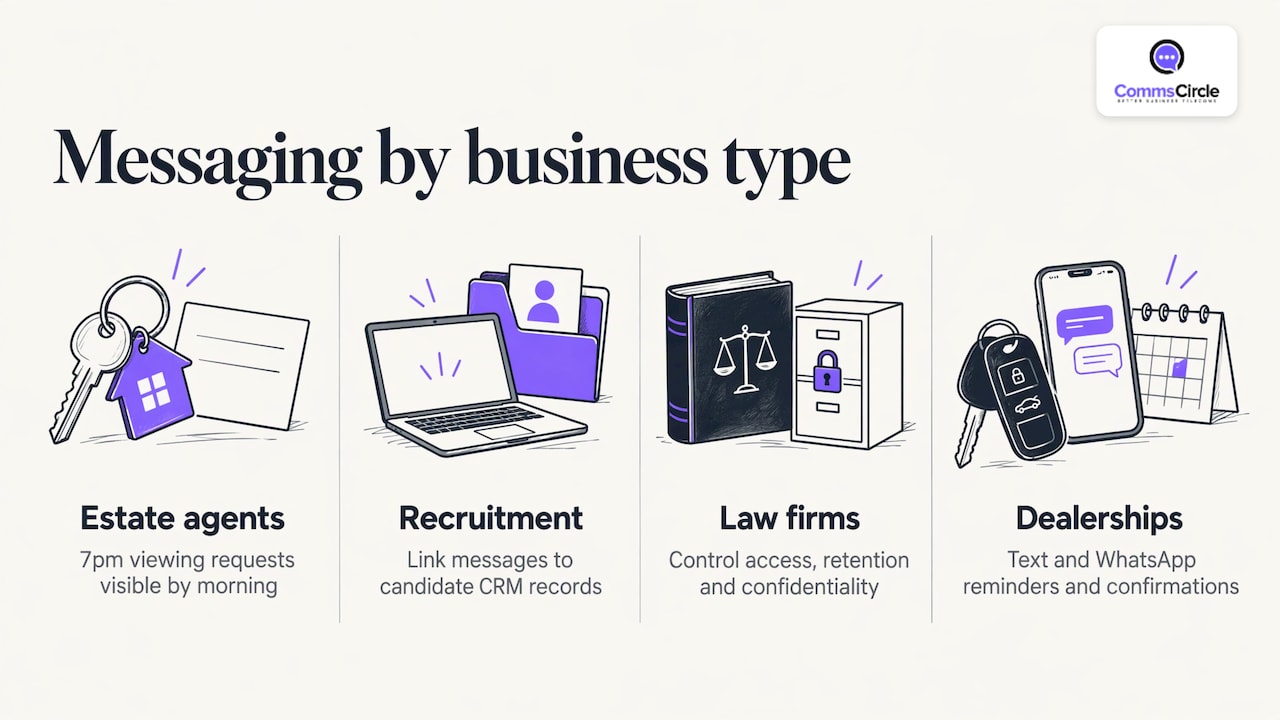
Estate agencies. Enquiries arrive from portals, the website and walk-ins, and buyers often prefer a text or WhatsApp to a call. A shared inbox means a viewing request sent at 7pm is visible to the whole lettings team in the morning. Our page on telecoms for estate agencies covers the wider setup.
Recruitment agencies. Candidates reply to texts and WhatsApp messages at all hours. Linking the conversation to the candidate record in your CRM matters here, because consultants need history at a glance. We build these CRM connections ourselves, including for JobAdder and Bullhorn, and you choose which candidate details appear when a call or message comes in. Whoever you speak to, ask exactly which CRM they connect to and confirm it in writing.
Law firms. Clients want updates without phoning and waiting. The priority is control: who can see which conversations, how messages are retained, and how client confidentiality is protected. Those questions come before any feature list.
Mortgage and financial brokers. Clients send questions and documents at all hours, and advisers need a complete record of what was said and when. Keep conversations on a platform the firm controls rather than on advisers’ personal phones, and check your FCA record-keeping obligations with your compliance lead before switching on a new channel.
Car dealerships and other appointment-driven businesses. Reminders, confirmations and quick replies about stock or servicing suit text and WhatsApp. See telecoms for car dealerships for how that fits with phones and mobiles.
Features to look for, in order of importance
Lists of 14 or 15 features from review sites are not useful when you have 30 staff. Use this order instead.
1. The channels you actually use
Check that the platform supports your real channels, not a long list of ones you will never touch. Guideflow puts channel coverage first in its checklist, and it is the right first question.
2. Shared history and assignment
Every message should show who is handling it and what was said before. Without that, you have a shared inbox in name only.
3. A clean handover from automation
Automated replies can answer opening-hours questions or collect details. Anything involving a complaint, a price or a decision should reach a person quickly. Judge any automation by how easily the customer reaches a human, not by how much it deflects.
4. CRM connection
The conversation should land on the customer record. Be specific when you ask: which CRM, which fields, one-way or two-way. Do not accept a general statement that it “integrates with CRMs”.
5. Reporting you will read
Response times, volumes by channel and out-of-hours demand are useful. A dashboard with fifty charts that nobody opens is not.
6. Data location and UK support
Aggregator guides for UK buyers, such as this UK guide to customer communication platforms, also list UK or EU data residency and local support among the things to weigh. Ask where data is stored and who you speak to when something breaks. With Circle Voice and Circle WhatsApp, your data is stored in the UK and support comes from our own team in East London.
Check your own needs before you compare products
The quickest way to avoid a poor purchase is to document your current position first. The same UK guide recommends noting your channels, message volumes, who handles them and what customers expect before looking at platforms. A one-page version is enough:
| Question | Your answer |
|---|---|
| Which channels do customers use to reach us now? | |
| Roughly how many messages and calls a day? | |
| How many of those arrive outside office hours? | |
| Who answers them today? | |
| Which system holds our customer records? | |
| What do customers expect as a reply time? |
Take this to every provider. A good one will ask you these questions before quoting.
The rules you need to know
Marketing messages and consent
A service message, such as confirming a booking the customer made, is different from marketing. If you send marketing by text, WhatsApp or email, the Privacy and Electronic Communications Regulations (PECR) apply. The ICO’s guidance says PECR covers anyone who sends or instigates direct marketing by electronic mail, and that consent must specifically cover the type of marketing you send. Different rules apply depending on whether the recipient is an individual or a company, so check your lists before any campaign.
WhatsApp’s own rules
WhatsApp sets conditions on top of the law. Under the WhatsApp Business Messaging Policy, a business on the WhatsApp Business Platform can reply freely within a 24-hour customer service window that opens and resets with each customer message. Outside that window, it can only send approved message templates. In practice, you can answer a customer who just wrote to you, but you cannot start a fresh chat with free-form text. Plan your reminders and follow-ups around that.
Keeping your existing WhatsApp number. Many businesses already use the WhatsApp Business app on a single phone. Ask whether a provider supports WhatsApp Coexistence, which connects the number your customers already know to a shared platform while the app keeps working on the phone. Circle WhatsApp supports it, so you do not have to change numbers or tell customers anything new.
If something goes wrong
Customer messages contain personal data, so a lost phone or a misdirected message can be a personal data breach. The ICO’s page on responding to a personal data breach says reportable breaches must go to the ICO without undue delay, and its title gives the 72-hour benchmark. Keep customer conversations on a managed platform rather than staff handsets, and you have a much better chance of knowing what was affected. For law firms and other regulated businesses, check your own regulator’s rules as well, and take advice from your compliance lead or solicitor on retention.
Benefits you can reasonably expect, and how to measure them
We cannot promise a specific saving or response time, and no honest provider can without knowing your volumes. What a well-set-up platform changes is visibility and consistency:
-
Fewer enquiries lost between personal phones and inboxes.
-
A single record of each conversation.
-
Clearer ownership of who replies.
-
Data you can use to decide on staffing and opening hours.
Measure from your own baseline. Before launch, count missed calls and unanswered messages for two weeks. Count again after a month. That comparison is worth more than any vendor figure.
Why the provider matters as much as the platform
Messaging does not live alone. A customer who cannot get through on WhatsApp calls the office. If the call is missed, the problem sits across your phone system, your broadband, your mobiles and the messaging service. When those come from different suppliers, each one points at the next.
That is the case for one accountable provider. We handle phone systems, broadband, business mobiles, messaging and IT support through one local team based in East London. We help prevent silos by bringing your calls, WhatsApp and text messages into one place on one platform, so nothing depends on whose phone a customer happened to contact. Your data is stored in the UK. When something goes wrong, you speak to people who know your setup, not a call centre. Our technical support runs 9am to 5:30pm, Monday to Friday. Issues raised out of hours are logged and picked up from 9am the next working day.
The pieces connect like this:
-
Circle Voice, our own cloud phone system, takes the calls that messaging cannot answer. Staff use the Circle Voice app on their mobile, so they make and take calls on the business number, not their personal one, and the customer’s CRM details can appear as a call comes in.
-
Circle WhatsApp puts WhatsApp conversations in a shared inbox your team can see and assign. With Coexistence, your existing number keeps working in the WhatsApp Business app too.
-
Our AI Agent can answer calls when your team is busy. As with any automation, decide in advance which calls must go to a person.
-
Business mobiles keep staff reachable. We offer O2, Vodafone and EE business plans, all on one bill, with a Mobile Manager portal for managing your mobile estate. Contract lengths and tariffs vary by network, so ask us to compare what is on offer. Our guide to choosing business mobile plans explains the decision.
-
Internet connectivity underpins all of it, since cloud messaging and cloud phones depend on a stable connection.
How to choose, step by step
-
Map your channels and volumes using the table above.
-
Decide who owns the inbox, including out-of-hours cover and holiday cover.
-
Shortlist two or three channels to launch with.
-
Confirm CRM connection in detail: which system, what syncs, who sets it up.
-
Agree consent and message templates with whoever handles compliance, especially for WhatsApp.
-
Check data location, access controls and retention.
-
Plan the rollout: train the team, set reply-time targets and review after a month.
Prices vary with user numbers, channels, message volumes and the other services bundled in, so compare like for like and ask for a written breakdown.
Talk to us about your setup
If your customers already message you on WhatsApp or text and your team is answering from personal phones, we can look at your phones, mobiles, broadband and messaging together and explain what would change. Circle Voice starts from £12.95 per user per month, and we confirm everything else in a clear written quote based on your users, channels and message volumes.
See how Circle WhatsApp and Smart Messaging work with Circle Voice and the rest of your telecoms, or get in touch through Comms Circle to talk it through.
FAQ
What is the difference between a customer messaging platform and team chat?
Team chat is for colleagues to talk to each other and organise work. A customer messaging platform handles conversations with customers across channels such as WhatsApp and text, with shared history, assignment and reporting. Many businesses use both, for different jobs.
Do I need a customer messaging platform if I only use WhatsApp?
Not necessarily on day one. Once more than one person answers customers, or messages arrive on personal phones, you will want shared access, history and clear ownership. Circle WhatsApp with Coexistence is a sensible first step, because you keep the number your customers already use.
Can I send marketing messages to customers on WhatsApp or text?
Only within the rules. PECR requires consent that specifically covers the marketing you send, and WhatsApp restricts free-form messages outside the 24-hour window to approved templates. Check your consent records before any campaign.
What should I ask a provider before signing?
Ask which channels and CRMs it connects to, where data is stored, who supports you and when, how billing is itemised, and what contract terms apply. Get the answers in writing and compare them against your channel and volume notes.

